

Najważniejsze szczegóły
Czas realizacji zamówienia:5-7天
Wysyłka:快递
Wprowadzenie produktu
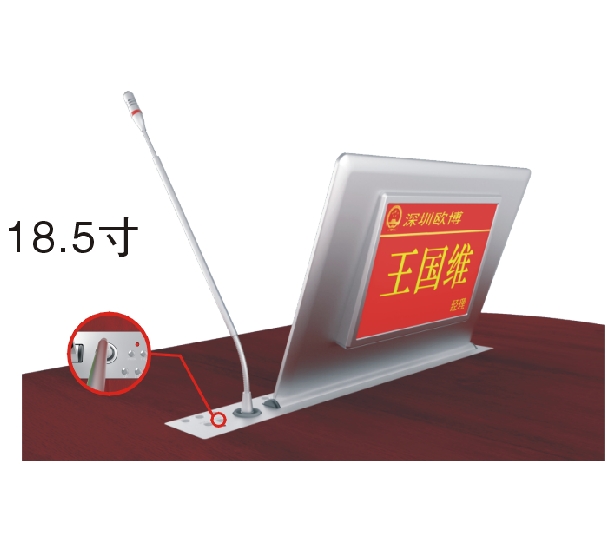
Paperless meeting system – 18.5″ Ultra‑thin Dual‑screen Integrated Lift Terminal (Full Aluminum, 1366×768, 10‑point Touch)
★ 1. The elevator and screen rotating shaft are connected together, without backplane connection and exposed screws. The whole is simple, noble and grand, showing the noble quality; The lifter and screen are designed and transported independently (the screen and lifter can be separated, and FPC flexible cable is connected). Ensure safe and convenient transportation and maintenance. It can also be upgraded independently.
★ 2. Material and process: the screen and elevator panel are made of full aluminum alloy shell, with overall CNC design, integrated shaping of fine carving, and sandblasting and anodizing treatment. Product color: brushed black/silver sandblasting black/silver (other colors can be customized).
★ 3. The screen size adopts 18.5 inch LCD screen; Resolution: 1366 * 768; Screen view angle: IPS full view screen; Type of touch screen: magnetic capacitance screen, 10 point touch control; Display scale: 16:9; Brightness: 400 lumens; Static contrast: 6000:1.
★ 4. Screen interface: In order to avoid the failure rate and poor contact of multiple interfaces, the screen and the elevator need to use a high fusion FPC flexible cable HD interface to achieve the overall transmission of "screen power supply", "image", "data" and "touch".
☆ 5. Overall size of touch display screen: 450 mm long, 290 mm high, and only 8.8 mm at the thinnest part of the screen with a maximum thickness of 11.8 mm.
★ 6. Dimension of elevator panel: 550mm long, 73mm wide and 5mm thick.
☆ 7. Double silent slide rail, matched with gear bite lifting, multi-point balanced lifting system is stable and reliable.
☆ 8. The lifter control software supports PC installation, is compatible with common operating systems, and can control the lifter's rising, pausing, falling and other movement states in a unified way or in any group.
☆ 9. The lifter panel is equipped with: rise, pause, fall, multimedia conference terminal switch, USB interface, etc.
☆ 10. The control mode supports manual 232 control, remote control and manual control.
★ 11. When the screen rises to the right position, the automatic tilt angle is 15 degrees to ensure the display's ergonomic optimal viewing angle and touch angle.
★ 2. Material and process: the screen and elevator panel are made of full aluminum alloy shell, with overall CNC design, integrated shaping of fine carving, and sandblasting and anodizing treatment. Product color: brushed black/silver sandblasting black/silver (other colors can be customized).
★ 3. The screen size adopts 18.5 inch LCD screen; Resolution: 1366 * 768; Screen view angle: IPS full view screen; Type of touch screen: magnetic capacitance screen, 10 point touch control; Display scale: 16:9; Brightness: 400 lumens; Static contrast: 6000:1.
★ 4. Screen interface: In order to avoid the failure rate and poor contact of multiple interfaces, the screen and the elevator need to use a high fusion FPC flexible cable HD interface to achieve the overall transmission of "screen power supply", "image", "data" and "touch".
☆ 5. Overall size of touch display screen: 450 mm long, 290 mm high, and only 8.8 mm at the thinnest part of the screen with a maximum thickness of 11.8 mm.
★ 6. Dimension of elevator panel: 550mm long, 73mm wide and 5mm thick.
☆ 7. Double silent slide rail, matched with gear bite lifting, multi-point balanced lifting system is stable and reliable.
☆ 8. The lifter control software supports PC installation, is compatible with common operating systems, and can control the lifter's rising, pausing, falling and other movement states in a unified way or in any group.
☆ 9. The lifter panel is equipped with: rise, pause, fall, multimedia conference terminal switch, USB interface, etc.
☆ 10. The control mode supports manual 232 control, remote control and manual control.
★ 11. When the screen rises to the right position, the automatic tilt angle is 15 degrees to ensure the display's ergonomic optimal viewing angle and touch angle.
Host configuration
★ Host hardware configuration: Intel dual core processor, CPU frequency 3.3GHz; Memory: 4GB DDR3; Hard disk: 32G SSD solid state.
★ System and architecture: Windows 7 system is adopted to ensure the compatibility and scalability of office software and other software; The client software adopts C/S architecture, giving full play to the processing capacity and stability of the client PC.
★ It supports wired and wireless hybrid networking and cross network segment operation.
★ It supports cross platform operation and hybrid networking operation of Android terminal, Windows terminal, Linux terminal, and realizes the following software functions.
★ Host hardware configuration: Intel dual core processor, CPU frequency 3.3GHz; Memory: 4GB DDR3; Hard disk: 32G SSD solid state.
★ System and architecture: Windows 7 system is adopted to ensure the compatibility and scalability of office software and other software; The client software adopts C/S architecture, giving full play to the processing capacity and stability of the client PC.
★ It supports wired and wireless hybrid networking and cross network segment operation.
★ It supports cross platform operation and hybrid networking operation of Android terminal, Windows terminal, Linux terminal, and realizes the following software functions.
Software functions
☆ 1. Nameplate display function: support the display of person name, unit, position and background picture information imported by background software.
☆ 2. Conference slogan function: display the conference slogan content and background pictures pushed by the background.
☆ 3. Conference information function: display the conference information pushed by the background (conference name, conference time, conference location, host, participants' names and position information).
☆ 4. Conference agenda function: display the conference agenda arrangement information pushed in the background.
☆ 5. Conference topic function: display the conference topics pushed in the background according to the conference process and permissions, and the documents in the topic support office documents such as word, ppt, excel, etc;
☆ 6. Document annotation function: Participants can make handwritten annotations on the touch screen of the conference terminal to circle or trace the documents in the conference documents, which is convenient for explaining the key points and putting forward their own opinions on the modification of the conference documents when speaking. It supports handwriting, wireless keyboard, and handwritten board writing in various forms. After annotation, the documents can be customized to choose the saving path, such as local, server, etc.
☆ 7. Basic conference functions: support conference check‑in (signature free can be set in the background), voting (real name anonymity can be set in the background), interactive electronic whiteboard (personal use and online use), document annotation (original document annotation and quick annotation), information exchange function (instant message, participants can have one‑to‑one or one to many conversation with other participants), conference service call (tea, paper and pen, etc., participants can also customize input demand information, and the background will arrange services according to demand when receiving messages), receiving notification information pushed by the background software, and other conference functions.
★ 8. One screen broadcast function: support any conference terminal with the same screen broadcast authority to use one button one screen to other conference terminals and large screens; Support the dynamic playback of PPT files in the same screen broadcast status, ensure the special effect of PPT playback, support the zoom in and zoom out of documents displayed on the same screen, and ensure the touch function of the touch screen; It supports the synchronization of audio and video files to other conference terminals and large screen projection, the synchronization of voice to the sound mixing console, the support of 1080P video broadcast on the same screen without reducing the image quality, the receiver 1080P original image quality display, the frame rate reaches 20 frames, to ensure the smoothness of video images, and the same screen delay is less than 300 milliseconds. The same screen broadcast signal supports mute transmission and mute reception.
☆ 9. Asynchronous browsing function: it supports any conference terminal with authority to switch the remote speaker screen with one key to the local terminal screen, and complete the free interaction of signals. Participants can view operations and their own documents through this function.
☆ 10. Tracking speaker function: the conference terminal in asynchronous browsing status supports one key synchronization to any screen of the speaker at this time and keeps real‑time consistency.
★ 11. External signal display function: support external signals to be displayed on the same screen to all participants' terminals in real time and synchronously (external signals include video signals of matrix switching, computer signals, notebook signals, camera signals, DVD signals, multimedia sockets, etc.).
★ 12. Temporary file function: support any file in the participants' external USB flash drive to broadcast to other conference terminals and large screens by one button, and support the sharing of conference files to other participants.
★ 13. PC use function: support paperless software interface and Windows interface switching, carry out ordinary computer operation, and the screen can be broadcast on the same screen (such as computer use training, browser browsing, OA software and other operations can be demonstrated on the same screen).
★ 14. Chairman control function: support single chairman or multi chairman function; The chairman function has the authority to control the conference process, which can be: "Enable unified sign in; switch all terminal function displays: conference slogan, welcome page, nameplate display, conference main interface; enable conference topics; initiate and end voting; the chairman machine can select the same screen broadcast signal source (external signal or participant terminal) to force the same screen to all terminals and large screen projection or only the same screen to large screen projection; end the same screen; end the meeting; close the conference system and other functions".
☆ 1. Nameplate display function: support the display of person name, unit, position and background picture information imported by background software.
☆ 2. Conference slogan function: display the conference slogan content and background pictures pushed by the background.
☆ 3. Conference information function: display the conference information pushed by the background (conference name, conference time, conference location, host, participants' names and position information).
☆ 4. Conference agenda function: display the conference agenda arrangement information pushed in the background.
☆ 5. Conference topic function: display the conference topics pushed in the background according to the conference process and permissions, and the documents in the topic support office documents such as word, ppt, excel, etc;
☆ 6. Document annotation function: Participants can make handwritten annotations on the touch screen of the conference terminal to circle or trace the documents in the conference documents, which is convenient for explaining the key points and putting forward their own opinions on the modification of the conference documents when speaking. It supports handwriting, wireless keyboard, and handwritten board writing in various forms. After annotation, the documents can be customized to choose the saving path, such as local, server, etc.
☆ 7. Basic conference functions: support conference check‑in (signature free can be set in the background), voting (real name anonymity can be set in the background), interactive electronic whiteboard (personal use and online use), document annotation (original document annotation and quick annotation), information exchange function (instant message, participants can have one‑to‑one or one to many conversation with other participants), conference service call (tea, paper and pen, etc., participants can also customize input demand information, and the background will arrange services according to demand when receiving messages), receiving notification information pushed by the background software, and other conference functions.
★ 8. One screen broadcast function: support any conference terminal with the same screen broadcast authority to use one button one screen to other conference terminals and large screens; Support the dynamic playback of PPT files in the same screen broadcast status, ensure the special effect of PPT playback, support the zoom in and zoom out of documents displayed on the same screen, and ensure the touch function of the touch screen; It supports the synchronization of audio and video files to other conference terminals and large screen projection, the synchronization of voice to the sound mixing console, the support of 1080P video broadcast on the same screen without reducing the image quality, the receiver 1080P original image quality display, the frame rate reaches 20 frames, to ensure the smoothness of video images, and the same screen delay is less than 300 milliseconds. The same screen broadcast signal supports mute transmission and mute reception.
☆ 9. Asynchronous browsing function: it supports any conference terminal with authority to switch the remote speaker screen with one key to the local terminal screen, and complete the free interaction of signals. Participants can view operations and their own documents through this function.
☆ 10. Tracking speaker function: the conference terminal in asynchronous browsing status supports one key synchronization to any screen of the speaker at this time and keeps real‑time consistency.
★ 11. External signal display function: support external signals to be displayed on the same screen to all participants' terminals in real time and synchronously (external signals include video signals of matrix switching, computer signals, notebook signals, camera signals, DVD signals, multimedia sockets, etc.).
★ 12. Temporary file function: support any file in the participants' external USB flash drive to broadcast to other conference terminals and large screens by one button, and support the sharing of conference files to other participants.
★ 13. PC use function: support paperless software interface and Windows interface switching, carry out ordinary computer operation, and the screen can be broadcast on the same screen (such as computer use training, browser browsing, OA software and other operations can be demonstrated on the same screen).
★ 14. Chairman control function: support single chairman or multi chairman function; The chairman function has the authority to control the conference process, which can be: "Enable unified sign in; switch all terminal function displays: conference slogan, welcome page, nameplate display, conference main interface; enable conference topics; initiate and end voting; the chairman machine can select the same screen broadcast signal source (external signal or participant terminal) to force the same screen to all terminals and large screen projection or only the same screen to large screen projection; end the same screen; end the meeting; close the conference system and other functions".
This paperless meeting system 18.5″ ultra‑thin dual‑screen lift terminal combines a precision lifter, high‑brightness IPS touch display, and full paperless conference software, perfectly meeting the needs of modern digital meetings.
In summary, this paperless meeting system 18.5″ integrated lift terminal with aviation aluminum construction, silent lifting mechanism, and comprehensive features (nameplate, voting, annotation, screen sharing, etc.) is the ideal choice for high‑end conference centers, boardrooms, and government meeting halls.


