

Essential details
Lead time:5-7天
Shipping:Express Delivery
Product Introduction
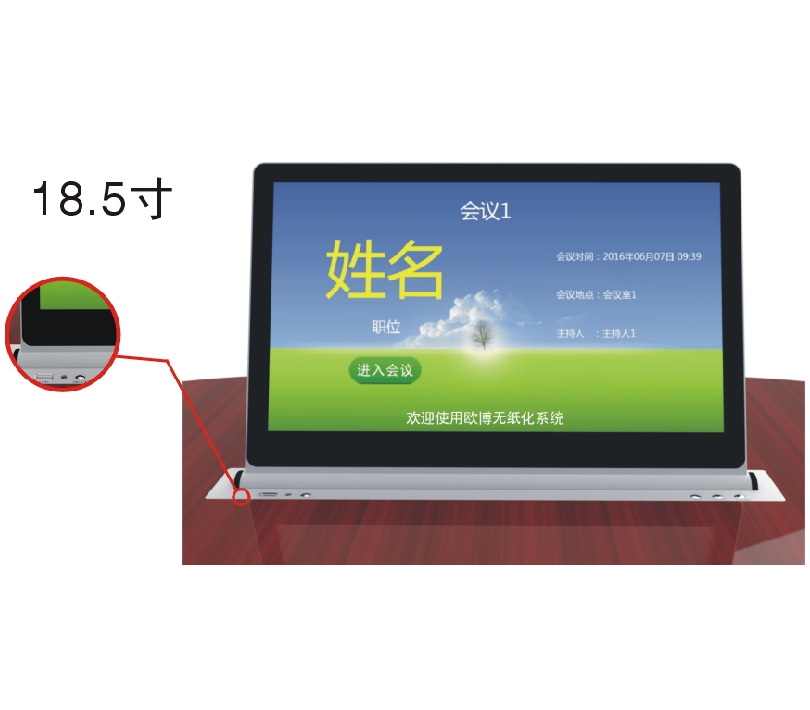
Paperless meeting system – 18.5″ Ultra‑thin Single‑screen Integrated Lift Terminal (Full Aluminum, 1366×768, 10‑point Touch)
★ 1. The elevator and the screen rotation shaft are connected as a single unit. There is no backplate connection and no exposed screws. The overall design is simple, elegant and grand, highlighting the noble quality. The elevator and the screen are independently designed and transported (the screen and the elevator can be disassembled, and the FPC flexible cable is connected). This ensures safe and convenient transportation and maintenance. It can also be independently upgraded.
★ 2. Material and Craftsmanship: The screen and the lifting mechanism panel are made of full aluminum alloy shells. The overall design is CNC, meticulously crafted and formed as one piece. They undergo sandblasting and anodizing treatment. Product colors: brushed black/silver, sandblasted black/silver (other colors can be customized).
★ 3. The screen size is 18.5 inches with a liquid crystal display; resolution: 1366*768; screen viewing angle: IPS full-angle screen; touchscreen type: magnetic capacitive screen with 10-point touch; display ratio: 16:9; brightness: 400 lumens; static contrast ratio: 6000:1.
★ 4. Screen interface: To prevent the failure rate of multiple interfaces and the problem of poor contact causing the device to malfunction, the screen and the elevator mechanism need to adopt a highly integrated FPC flexible cable high-definition interface to achieve the overall transmission of "screen power supply", "image", "data" and "touch control".
☆5. Overall size of the touch screen: 450mm in length and 290mm in height. The thickest part of the screen is 11.8mm, while the thinnest part is only 8.8mm.
★ 6. Dimensions of the lifting mechanism panel: Length 550MM, Width 73MM, Thickness 5MM.
☆7. Dual silent sliding rails, combined with gear engagement for lifting, and a multi-point balanced lifting system is stable and reliable.
☆8. The lifting controller control software is compatible with PC installation and is compatible with common operating systems. It can uniformly control or allow arbitrary grouping control of the lifting controller's movement states such as rising, pausing, and falling.
☆ 9. The elevator control panel is equipped with functions such as upward movement, pause, downward movement, multimedia conference terminal switch, and USB interface.
☆10. The control methods include hand-to-hand 232 control, remote control and manual control.
★11. Once the screen is fully raised, it automatically tilts at an angle of 15 degrees, ensuring the best ergonomic viewing angle and touch control angle for the monitor.
★ 2. Material and Craftsmanship: The screen and the lifting mechanism panel are made of full aluminum alloy shells. The overall design is CNC, meticulously crafted and formed as one piece. They undergo sandblasting and anodizing treatment. Product colors: brushed black/silver, sandblasted black/silver (other colors can be customized).
★ 3. The screen size is 18.5 inches with a liquid crystal display; resolution: 1366*768; screen viewing angle: IPS full-angle screen; touchscreen type: magnetic capacitive screen with 10-point touch; display ratio: 16:9; brightness: 400 lumens; static contrast ratio: 6000:1.
★ 4. Screen interface: To prevent the failure rate of multiple interfaces and the problem of poor contact causing the device to malfunction, the screen and the elevator mechanism need to adopt a highly integrated FPC flexible cable high-definition interface to achieve the overall transmission of "screen power supply", "image", "data" and "touch control".
☆5. Overall size of the touch screen: 450mm in length and 290mm in height. The thickest part of the screen is 11.8mm, while the thinnest part is only 8.8mm.
★ 6. Dimensions of the lifting mechanism panel: Length 550MM, Width 73MM, Thickness 5MM.
☆7. Dual silent sliding rails, combined with gear engagement for lifting, and a multi-point balanced lifting system is stable and reliable.
☆8. The lifting controller control software is compatible with PC installation and is compatible with common operating systems. It can uniformly control or allow arbitrary grouping control of the lifting controller's movement states such as rising, pausing, and falling.
☆ 9. The elevator control panel is equipped with functions such as upward movement, pause, downward movement, multimedia conference terminal switch, and USB interface.
☆10. The control methods include hand-to-hand 232 control, remote control and manual control.
★11. Once the screen is fully raised, it automatically tilts at an angle of 15 degrees, ensuring the best ergonomic viewing angle and touch control angle for the monitor.
Host Configuration
★Host hardware configuration: Intel dual-core processor, CPU clock speed 3.3 GHz; Memory: 4GB DDR3; Hard drive: 32G SSD solid state.
★ System and Architecture: Windows 7 operating system is adopted to ensure the compatibility and scalability of office software and other applications; the client software adopts a C/S architecture to fully utilize the processing capabilities and stability of the client PCs.
★ Supports both wired and wireless hybrid networking, and is capable of operating across network segments.
★ Supports cross-platform operation and is compatible with Android terminals, Windows terminals, and Linux terminals for mixed networking. It also implements the following software functions.
★Host hardware configuration: Intel dual-core processor, CPU clock speed 3.3 GHz; Memory: 4GB DDR3; Hard drive: 32G SSD solid state.
★ System and Architecture: Windows 7 operating system is adopted to ensure the compatibility and scalability of office software and other applications; the client software adopts a C/S architecture to fully utilize the processing capabilities and stability of the client PCs.
★ Supports both wired and wireless hybrid networking, and is capable of operating across network segments.
★ Supports cross-platform operation and is compatible with Android terminals, Windows terminals, and Linux terminals for mixed networking. It also implements the following software functions.
Software functions
☆1. Nameplate display function: Supports displaying the personal names, units, positions, and background image information imported by the background software.
☆2. Meeting slogan function: Displays the content and background image of the meeting slogans pushed from the background.
☆3. Meeting Information Function: Displays the meeting information pushed from the background (including meeting name, meeting time, meeting location, host name, names and positions of the participants).
☆4. Meeting Agenda Function: Displays the meeting agenda scheduling information pushed from the background.
☆5. Meeting Agenda Function: Display the pushed meeting agendas according to the meeting progress and permissions. The files within the agendas support various office documents such as Word, PPT, and Excel.
☆6. Document Annotation Function: Participants can make handwritten annotations, draw circles or lines on the touch screen of the conference terminal for the documents in the meeting files. This feature facilitates them to explain key points during their speeches and propose their own opinions on the modifications of the meeting files. It supports various forms of writing such as handwriting, wireless keyboards, and tablet writing. After annotation, the document can be customarily selected to save at paths like local storage or servers.
☆7. Basic Conference Functions: Support conference registration (background setting for optional no-sign-up), voting and decision-making (background setting for real-name or anonymous voting), interactive electronic whiteboard (for individual use and online use), document annotation (original document annotation and quick annotation), information exchange function (instant messaging, participants can have one-on-one or one-to-many conversations with other attendees), conference service calls (tea, pens, etc., participants can also customize input of demand information, and the background will arrange services according to the requirements), receiving notification information pushed by the background software, etc. These are the conference functions.
★ 8. Screen Sharing Function: It supports any conference terminal with screen sharing permission to directly share the screen to other conference terminals and the large screen. It also supports dynamic playback of PPT files in the screen sharing state, ensuring the playback effects of the PPT. It supports display features such as zooming in and out of documents on the screen, ensuring the touch function of the touch screen. It supports synchronizing audio and video files to other conference terminals and the large screen projection, synchronizing the sound to the mixing console, and supports 1080P video screen sharing without reducing the picture quality. The receiving end displays the 1080P original picture quality, with a frame rate of 20 frames, ensuring the smoothness of the video picture. The screen sharing delay is less than 300 milliseconds. The screen sharing signal supports silent sending and receiving.
☆9. Asynchronous browsing function: It supports any conference terminal with permission to switch the remote presenter's screen display and the local terminal screen display at once, enabling free interaction of signals. Participants can use this function to view operations, view their own documents, etc.
☆10. Tracking of Main Speaker Function: Conference terminals in the asynchronous browsing mode support the ability to instantly synchronize to any screen of the main speaker at that moment and maintain real-time consistency.
★11. External Signal Display Function: Supports real-time synchronization of external signals onto all participant terminals and simultaneous display (external signals include video signals from matrix switching, computer signals, laptop signals, camera signals, DVD signals, multimedia sockets, etc.).
★12. Temporary File Function: It enables users to quickly broadcast any file from an external USB drive to other conference terminals and large screens. It also supports sharing meeting files with other participants.
★13. Function of PC computer: It supports switching between paperless software interface and Windows interface, allowing for normal computer operations. Moreover, the screen can be broadcast simultaneously (for example, computer training, web browsing with the browser, OA software operation, and other operations can all be demonstrated on the same screen).
★14. Chairman Control Function: Supports single-chairperson or multiple-chairperson mode; The chairman function has the authority to control the meeting process, and can: "Enable unified sign-in; Switch the display of all terminal functions: meeting slogan, welcome page, nameplate display, main meeting interface; Enable meeting topics; Initiate and end voting; The chairman can select the same-screen broadcast signal source (external signal or participant terminal) for forced same-screen display to all terminals and large screen projection or only same-screen broadcast to the large screen projection; Can end the same-screen display; End the meeting; Close the meeting system, etc."
☆1. Nameplate display function: Supports displaying the personal names, units, positions, and background image information imported by the background software.
☆2. Meeting slogan function: Displays the content and background image of the meeting slogans pushed from the background.
☆3. Meeting Information Function: Displays the meeting information pushed from the background (including meeting name, meeting time, meeting location, host name, names and positions of the participants).
☆4. Meeting Agenda Function: Displays the meeting agenda scheduling information pushed from the background.
☆5. Meeting Agenda Function: Display the pushed meeting agendas according to the meeting progress and permissions. The files within the agendas support various office documents such as Word, PPT, and Excel.
☆6. Document Annotation Function: Participants can make handwritten annotations, draw circles or lines on the touch screen of the conference terminal for the documents in the meeting files. This feature facilitates them to explain key points during their speeches and propose their own opinions on the modifications of the meeting files. It supports various forms of writing such as handwriting, wireless keyboards, and tablet writing. After annotation, the document can be customarily selected to save at paths like local storage or servers.
☆7. Basic Conference Functions: Support conference registration (background setting for optional no-sign-up), voting and decision-making (background setting for real-name or anonymous voting), interactive electronic whiteboard (for individual use and online use), document annotation (original document annotation and quick annotation), information exchange function (instant messaging, participants can have one-on-one or one-to-many conversations with other attendees), conference service calls (tea, pens, etc., participants can also customize input of demand information, and the background will arrange services according to the requirements), receiving notification information pushed by the background software, etc. These are the conference functions.
★ 8. Screen Sharing Function: It supports any conference terminal with screen sharing permission to directly share the screen to other conference terminals and the large screen. It also supports dynamic playback of PPT files in the screen sharing state, ensuring the playback effects of the PPT. It supports display features such as zooming in and out of documents on the screen, ensuring the touch function of the touch screen. It supports synchronizing audio and video files to other conference terminals and the large screen projection, synchronizing the sound to the mixing console, and supports 1080P video screen sharing without reducing the picture quality. The receiving end displays the 1080P original picture quality, with a frame rate of 20 frames, ensuring the smoothness of the video picture. The screen sharing delay is less than 300 milliseconds. The screen sharing signal supports silent sending and receiving.
☆9. Asynchronous browsing function: It supports any conference terminal with permission to switch the remote presenter's screen display and the local terminal screen display at once, enabling free interaction of signals. Participants can use this function to view operations, view their own documents, etc.
☆10. Tracking of Main Speaker Function: Conference terminals in the asynchronous browsing mode support the ability to instantly synchronize to any screen of the main speaker at that moment and maintain real-time consistency.
★11. External Signal Display Function: Supports real-time synchronization of external signals onto all participant terminals and simultaneous display (external signals include video signals from matrix switching, computer signals, laptop signals, camera signals, DVD signals, multimedia sockets, etc.).
★12. Temporary File Function: It enables users to quickly broadcast any file from an external USB drive to other conference terminals and large screens. It also supports sharing meeting files with other participants.
★13. Function of PC computer: It supports switching between paperless software interface and Windows interface, allowing for normal computer operations. Moreover, the screen can be broadcast simultaneously (for example, computer training, web browsing with the browser, OA software operation, and other operations can all be demonstrated on the same screen).
★14. Chairman Control Function: Supports single-chairperson or multiple-chairperson mode; The chairman function has the authority to control the meeting process, and can: "Enable unified sign-in; Switch the display of all terminal functions: meeting slogan, welcome page, nameplate display, main meeting interface; Enable meeting topics; Initiate and end voting; The chairman can select the same-screen broadcast signal source (external signal or participant terminal) for forced same-screen display to all terminals and large screen projection or only same-screen broadcast to the large screen projection; Can end the same-screen display; End the meeting; Close the meeting system, etc."
This paperless meeting system 18.5″ ultra‑thin single‑screen lift terminal integrates a precision lifter, a high‑brightness IPS touch display, and full paperless conference software, delivering seamless collaboration, screen sharing, and voting.
In summary, this paperless meeting system 18.5″ integrated lift terminal with aviation aluminum construction, silent lifting mechanism, and comprehensive features (nameplate, annotation, external signal input, chairman control) is the ideal choice for high‑end conference centers, boardrooms, and government meeting halls.


