

Essential details
Lead time:5-7天
Shipping:Express delivery
Product Introduction
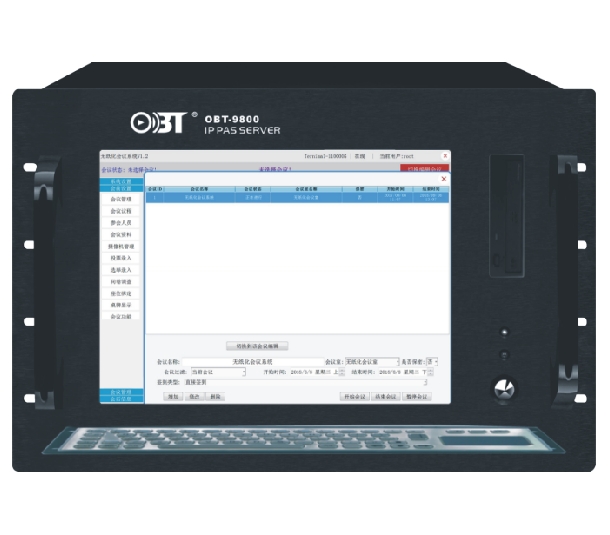
Paperless meeting system – High‑Performance Paperless Conference Server (8U Integrated, 15″ LCD, Dual Gigabit Ethernet)
Hardware Features
8U integrated structure chassis, 15-inch LCD display;
Intel dual-core CPU with a clock speed of 3.3GHz, 4 threads, 5GHz/S data bus.
4GB DDR3 1600MHz memory;
Dual Gigabit Ethernet card, RJ45 interface;
Supports touchscreen operation; integrated pull-out stainless steel keyboard, touch mouse;
The Windows architecture system ensures compatibility for expansion and third-party files.
8U integrated structure chassis, 15-inch LCD display;
Intel dual-core CPU with a clock speed of 3.3GHz, 4 threads, 5GHz/S data bus.
4GB DDR3 1600MHz memory;
Dual Gigabit Ethernet card, RJ45 interface;
Supports touchscreen operation; integrated pull-out stainless steel keyboard, touch mouse;
The Windows architecture system ensures compatibility for expansion and third-party files.
System Features
♦ In order to ensure stable direct communication between the server and the terminal, no third-party communication intermediary is required.
♦ Communication between non-paper-based devices can operate across different network segments;
♦ Permission Management: Supports various permission management schemes. It includes ordinary management accounts, system administrators, and meetings created by different management accounts are kept confidential from each other. System administrators have the authority to manage all meetings.
♦ Different meetings can be customized with different conference function blocks as needed.
♦ Centralized Control: During the meeting, it is possible to switch between various screens such as the welcome page, meeting information, display of names, and meeting slogans. It also supports unified control of the elevator and unified operation of power on/off.
Check-in Management: Monitors and manages the check-in process for the meeting.
♦ Meeting Voting: For the enabled voting options, participants can cast their votes and also view the real-time results. A voting list for the meeting and historical voting records are supported.
♦ Video Playback: Supports random playback of videos on the server, enables real-time viewing of video live streams, and allows full-screen display of videos. It can play 4K high-definition videos with a frame rate of 25 frames and a delay of less than 0.3 seconds;
♦ Floor Layout: To ensure that the interface can directly support horizontal layout arrangement, there is no need to call a third-party program. It supports simulating a meeting room before the event to arrange the participants and export the arrangement map. At the same time, it supports directly modifying the information of the participants on the simulation arrangement map. It also supports the temporary addition and removal of participants, and the updated participants will automatically be re-arranged according to the rules.
♦ File Management: Upload and import files. Support setting viewing permissions for files. If the participants do not have the permission to view, the terminal will automatically hide the display of this file. You can upload any format of file individually, and upload any format of files in batches.
♦ Topic Management: Add, edit meeting agendas, and enable/disable different topics. Topics can be displayed on the terminal based on user permissions, or they can be shown on the terminal interface according to the enabled status.
♦ Conference Services: Receive and process conference service information promptly during the meeting;
♦ Conference Communication: System notifications can be sent, or one-on-one or group meetings can be held with individual or multiple participants.
♦ In order to ensure stable direct communication between the server and the terminal, no third-party communication intermediary is required.
♦ Communication between non-paper-based devices can operate across different network segments;
♦ Permission Management: Supports various permission management schemes. It includes ordinary management accounts, system administrators, and meetings created by different management accounts are kept confidential from each other. System administrators have the authority to manage all meetings.
♦ Different meetings can be customized with different conference function blocks as needed.
♦ Centralized Control: During the meeting, it is possible to switch between various screens such as the welcome page, meeting information, display of names, and meeting slogans. It also supports unified control of the elevator and unified operation of power on/off.
Check-in Management: Monitors and manages the check-in process for the meeting.
♦ Meeting Voting: For the enabled voting options, participants can cast their votes and also view the real-time results. A voting list for the meeting and historical voting records are supported.
♦ Video Playback: Supports random playback of videos on the server, enables real-time viewing of video live streams, and allows full-screen display of videos. It can play 4K high-definition videos with a frame rate of 25 frames and a delay of less than 0.3 seconds;
♦ Floor Layout: To ensure that the interface can directly support horizontal layout arrangement, there is no need to call a third-party program. It supports simulating a meeting room before the event to arrange the participants and export the arrangement map. At the same time, it supports directly modifying the information of the participants on the simulation arrangement map. It also supports the temporary addition and removal of participants, and the updated participants will automatically be re-arranged according to the rules.
♦ File Management: Upload and import files. Support setting viewing permissions for files. If the participants do not have the permission to view, the terminal will automatically hide the display of this file. You can upload any format of file individually, and upload any format of files in batches.
♦ Topic Management: Add, edit meeting agendas, and enable/disable different topics. Topics can be displayed on the terminal based on user permissions, or they can be shown on the terminal interface according to the enabled status.
♦ Conference Services: Receive and process conference service information promptly during the meeting;
♦ Conference Communication: System notifications can be sent, or one-on-one or group meetings can be held with individual or multiple participants.
This paperless meeting system server provides centralized management, cross‑network communication, 4K video playback, and comprehensive file/topic control for efficient digital conferences.
In summary, this paperless meeting system 8U integrated server with 15″ touchscreen, dual NICs, and rich features (voting, floor layout, service handling) is the ideal choice for high‑end paperless meeting rooms, government halls, and corporate boardrooms.


